PUBLISH
The Publish function allows you to publish all the changes made in the website. This means that no changes will be shown to your visitor until you publish them in your CMS.
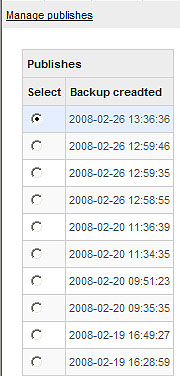
After pressing the Publish button from the top menuline of your CMS, you will see the Manage publishes screen:
This screen shows a list of all publishes made, with their exact date and time. This allows you to keep track of all publishes made and also restore an old publish if needed.
Every time you make changes to your website and publish them, a Backup is automatically created. The Backup created column shows a list of all publishes made.The last publish made is showed on the top. If you have made some changes to your website, added a page or made an update, the visitors will not see it until it is published here.
Once the publish screen appears the bottom action menu will also change. The following options will be available:
Publish - After pressing this button all the changes you have made in your website will be published, which means that the visitors will able to see them when they visit your website.
Restore - If you want to restore your website to a previous state, you may select the publish date you want to go back to and press the Restore button. Restore will bring back the past look and content of your website depending on the publish date you choose.
Delete - Just as its name suggests, this button will delete any published section. If you want to delete a published content from the past or your current published site, select the date and time